> For the complete documentation index, see [llms.txt](https://docs.dibbel.no/llms.txt). Markdown versions of documentation pages are available by appending `.md` to page URLs; this page is available as [Markdown](https://docs.dibbel.no/hurtigstart/hurtigtaster.md).
# Hurtigtaster
Ved å bruke hurtigtaster kan du utføre vanlige handlinger raskere og mer effektivt.
### Hurtigtaster i Dibbel
Hurtigtaster er tastaturkombinasjoner som lar deg utføre handlinger raskt, uten å bruke musen og klikke deg gjennom flere steg.
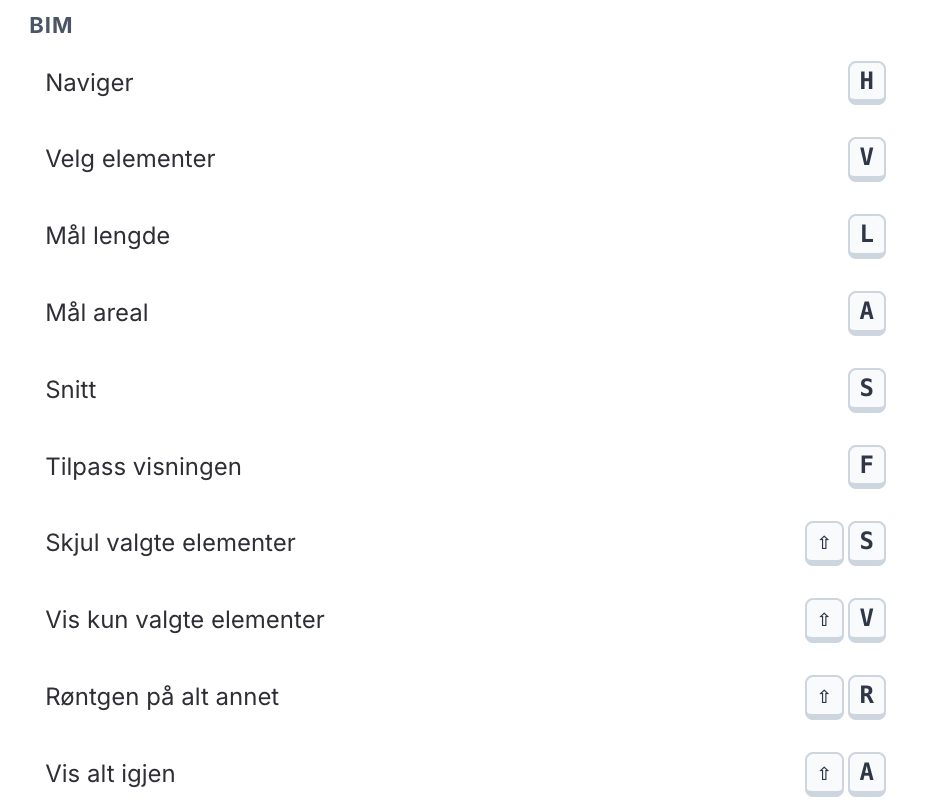
I Dibbels nettleser finnes det en egen hurtigtastmeny som gir oversikt over tilgjengelige snarveier. Menyen er delt inn i ulike områder, slik at du enkelt kan finne hurtigtastene some r relevante for handlingen du ønsker å utføre.
### Slik åpner du hurtigtastmenyen
For å åpne hurtigtastmenyen, bruker du en hurtigtast på tastaturet.
* På Mac: :command: + `H`
* På Windows: `Ctrl` + `H`
{% hint style="info" icon="keyboard" %}
Hurtigtastene i menyen tilpasses automatisk etter hvilket operativsystem og tastatur du bruker.
{% endhint %}
**Hurtigtastmeny ulike områder**
Global
Redigering
Dataset
Fakturering
E-post
BIM
Andre hurtigtaster
Enkelte hurtigtaster er også tilgjengelige utenfor hurtigtastmenyen.
* Mørk modus: Trykk ⇧ + ⌘ + `L` for å aktivere mørk modus. Bruk samme hurtigtast for å gå tilbake til lys modus.