> For the complete documentation index, see [llms.txt](https://docs.dibbel.no/llms.txt). Markdown versions of documentation pages are available by appending `.md` to page URLs; this page is available as [Markdown](https://docs.dibbel.no/hurtigstart.md).

# Hurtigstart

### Hurtigstart i Dibbel

Dette er en hurtigstart for webversjonen av Dibbel, laget for å hjelpe deg raskt i gang med de viktigste funksjonene. For mer detaljerte steg og full gjennomgang av hver del av systemet, se brukerveiledningene under <a href="/pages/tfgQGWtjwqvvoe3YLyc9" class="button primary">Funksjoner</a>.&#x20;

{% stepper %}
{% step %}

### Opprett prosjekt med kunde

* Gå til **"Prosjekter"** fra hovedmenyen og klikk på **"Nytt prosjekt"**<br>

<div align="left"><figure><img src="/files/2URZCXaQdtYl2GKYwOPc" alt="" width="191"><figcaption></figcaption></figure></div>

<div align="left"><figure><img src="/files/mUohQNT6NXh7IPxqIgs7" alt="" width="375"><figcaption></figcaption></figure></div>

* Under **"Generelt"**, fyller du inn prosjektinformasjon og legger til kunde.

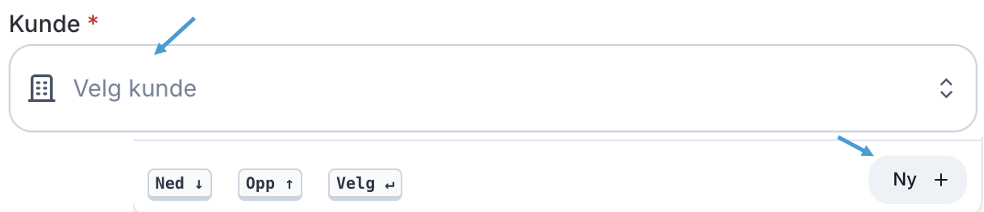
  * Opprett kunde ved å klikke på feltet **"Kunde"** og **"Ny +"** nederst til høyre i listen.\
    &#x20;

  <div align="left"><figure><img src="/files/MjoX9XsLuC7A2LN5wGvJ" alt="" width="375"><figcaption></figcaption></figure></div>

{% endstep %}

{% step %}

### Legg til bygning og plantegning

* Gå til **"Bygninger"** i prosjektmenyen og legg til bygning ved å klikke på **"Opprett bygning"**. <br>

<div align="left"><figure><img src="/files/tJYMrWR79y4zyWEjEw6o" alt="" width="203"><figcaption></figcaption></figure></div>

<div align="left"><figure><img src="/files/MImDqcBnACFA5eKFO4Pc" alt="" width="375"><figcaption></figcaption></figure></div>

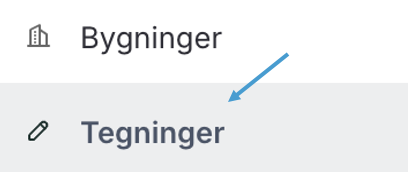
* Gå deretter til "Tegninger" i prosjektmenyen og videre på "Opprett tegning" for å laste opp og knytte tegning til bygning.\
  &#x20;&#x20;

<div align="left"><figure><img src="/files/HmZfW1D48KrNQWlHeneV" alt="" width="205"><figcaption></figcaption></figure></div>

<div align="left"><figure><img src="/files/BEsxuIqK89JnDo39OHd8" alt="" width="375"><figcaption></figcaption></figure></div>

&#x20;
{% endstep %}
{% endstepper %}

Ved å fullføre disse stegene har du lagt grunnmuren for arbeidet ditt i Dibbel. Prosjektet ditt er nå klart, og du kan gå videre med oppgaver som å opprette <a href="/pages/TghajI5qnZQzStbsI2Zv" class="button primary">Tilbud</a>, sende <a href="/pages/BPVVSbeBs1hEh7N9rRMy" class="button primary">Faktura</a>, registrere <a href="/pages/4ra01LyUIjgciPVcsfrk" class="button primary">Avvik</a>og følge opp prosjektet via dashboardet.

***

{% embed url="<https://app.supademo.com/demo/cmggl11aq78ks2nom920hiyqk?utm_source=link>" %}


---

# Agent Instructions
This documentation is published with GitBook. GitBook is the documentation platform designed so that both humans and AI agents can read, navigate, and reason over technical content effectively. Learn more at gitbook.com.

## Querying This Documentation
If you need additional information that is not directly available in this page, you can query the documentation dynamically by asking a question.

Perform an HTTP GET request on the current page URL with the `ask` query parameter:

```
GET https://docs.dibbel.no/hurtigstart.md?ask=<question>
```

The question should be specific, self-contained, and written in natural language.
The response will contain a direct answer to the question and relevant excerpts and sources from the documentation.

Use this mechanism when the answer is not explicitly present in the current page, you need clarification or additional context, or you want to retrieve related documentation sections.